WWDC 2026 focused pretty much on one thing: the new Siri. Apple's revamped assistant is powered by Google's Gemini and represents the most significant Siri update since 2011. The new Siri understands context from your personal data, sees what's on your screen, and can handle complex tasks. It's the biggest bet Apple has made on AI.
You can test iOS 27 and the new Siri immediately by installing the developer beta on your iPhone. Anyone with an Apple developer account can download it for free.
If you prefer a more stable version, wait until the public beta arrives. But if you're itching to get started testing out some of the new features Apple unveiled, here's how to get the developer beta up and running on your iPhone.
As with any beta software, you're likely to run into some bugs and issues along the way. It could also drain your battery more quickly than usual. If possible, we'd always recommend installing it on a separate device, given the amount of sensitive data likely stored on your main iPhone. The more stable public beta will launch next month.
How to install the iOS 27 developer beta
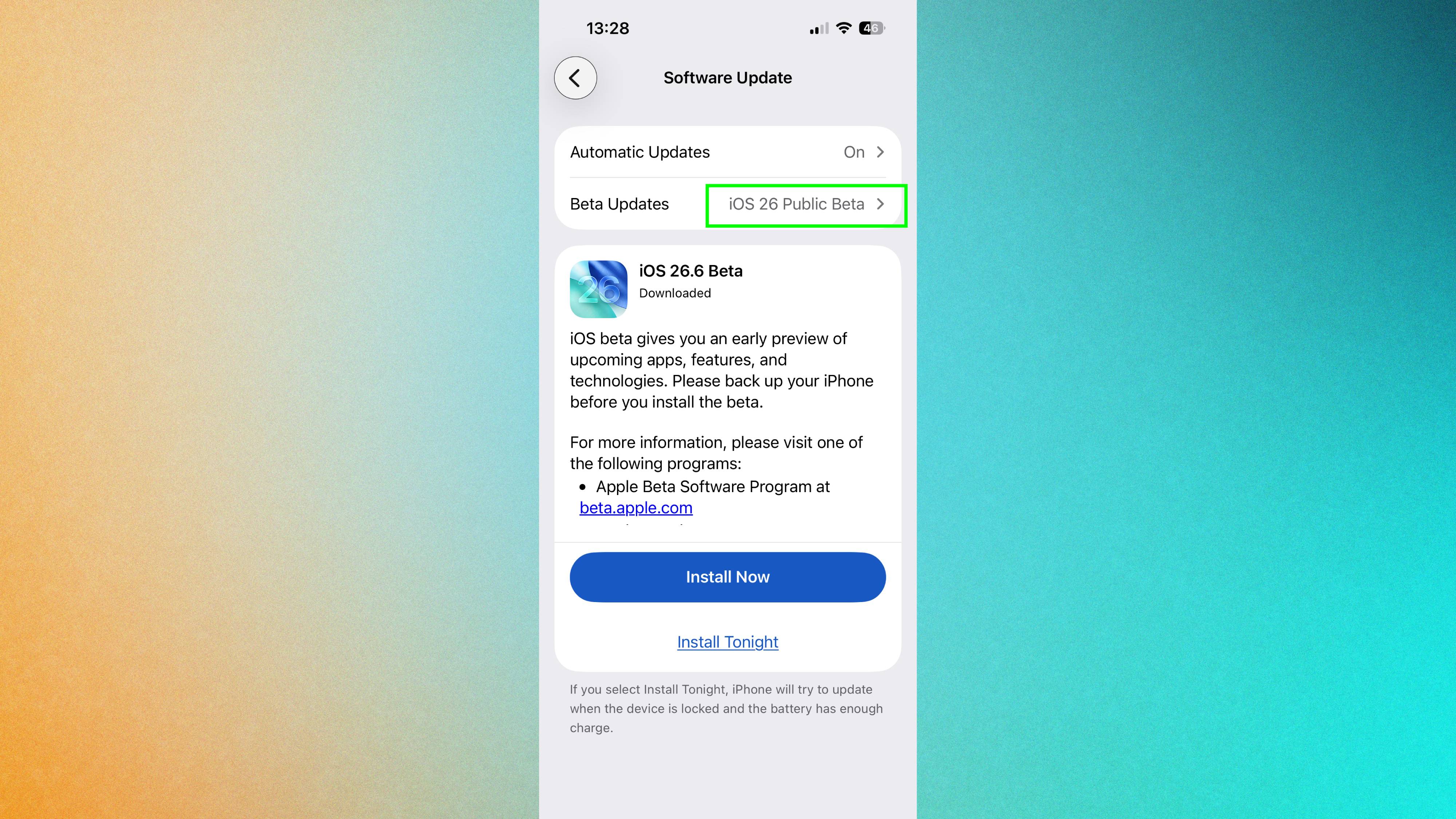
First, register as an Apple developer if you don't already have an account. It's free and takes just a few minutes. Then open Settings on your iPhone and tap "General." Select "Software Update", then tap "Beta Updates."
Choose "iOS 27 Developer Beta" when it appears. Your Apple developer account will automatically authorize access to the beta.
After selecting the developer beta, your iPhone will check for available updates. iOS 27 should be able to install right away.
Tap "Install Now" to begin the download. Your iPhone downloads the beta automatically and prompts you to restart. Follow the on-screen instructions and restart when prompted. Installation completes automatically.
Experience the revamped Siri
The new Siri lives in your Dynamic Island. Say "Siri" or long press the power button to activate it. The assistant now displays rich cards showing weather, calendar appointments, or other information relevant to your query.
Siri can now draft emails, compile meeting notes, and pull information from your personal data without asking follow-up questions. The assistant understands context from your apps, emails, and calendar. It's a dramatically different experience from previous Siri versions.
Keep in mind the beta version may not include every new feature mentioned at yesterday's keynote. Some features might not work perfectly yet, and app compatibility issues are common with early betas.