I thought I had a pretty good handle on my Google privacy settings — then I discovered a new AI feature that may be saving more of my activity than I realized.
Known as Search Services History, the setting is designed to help power advanced AI features across Google's ecosystem. But it also means that images, audio recordings and videos you submit while using certain Google services may be stored in your account history by default.
For some people, that's a useful feature. For others, it's another reminder that AI assistants are increasingly hovering over our personal data. When I learned about the change, I immediately checked my own account settings.
Key Takeaways
- The new setting: Google is quietly rolling out "Search Services History," a default account setting that saves media shared during AI interactions.
- The privacy risk: This setting permits the storage of uploaded photos, voice interactions, and analyzed videos within your personal account history.
- The balanced fix: Instead of completely disabling Web & App Activity — which breaks personalized features like Google Discover — users can turn off only the media-saving toggle in less than a minute.
What is Search Services history?
The new setting appears inside Google's Activity Controls and is intended to keep a record of media you share while interacting with AI-powered Google services.
That can include things like:
- Visual inputs: Photos uploaded to visual search tools or Lens.
- Voice clips: Audio recordings used for real-time voice interactions or voice searches.
- Rich media: Videos submitted for context or multimodal AI analysis.
- AI context: Other personal media shared while using supported AI experiences.
Google says this information can be used to improve its services and that various protections are applied to reduce the amount of personally identifiable information associated with the data. Still, some users may prefer not to have those interactions stored at all.
The 20-second fix
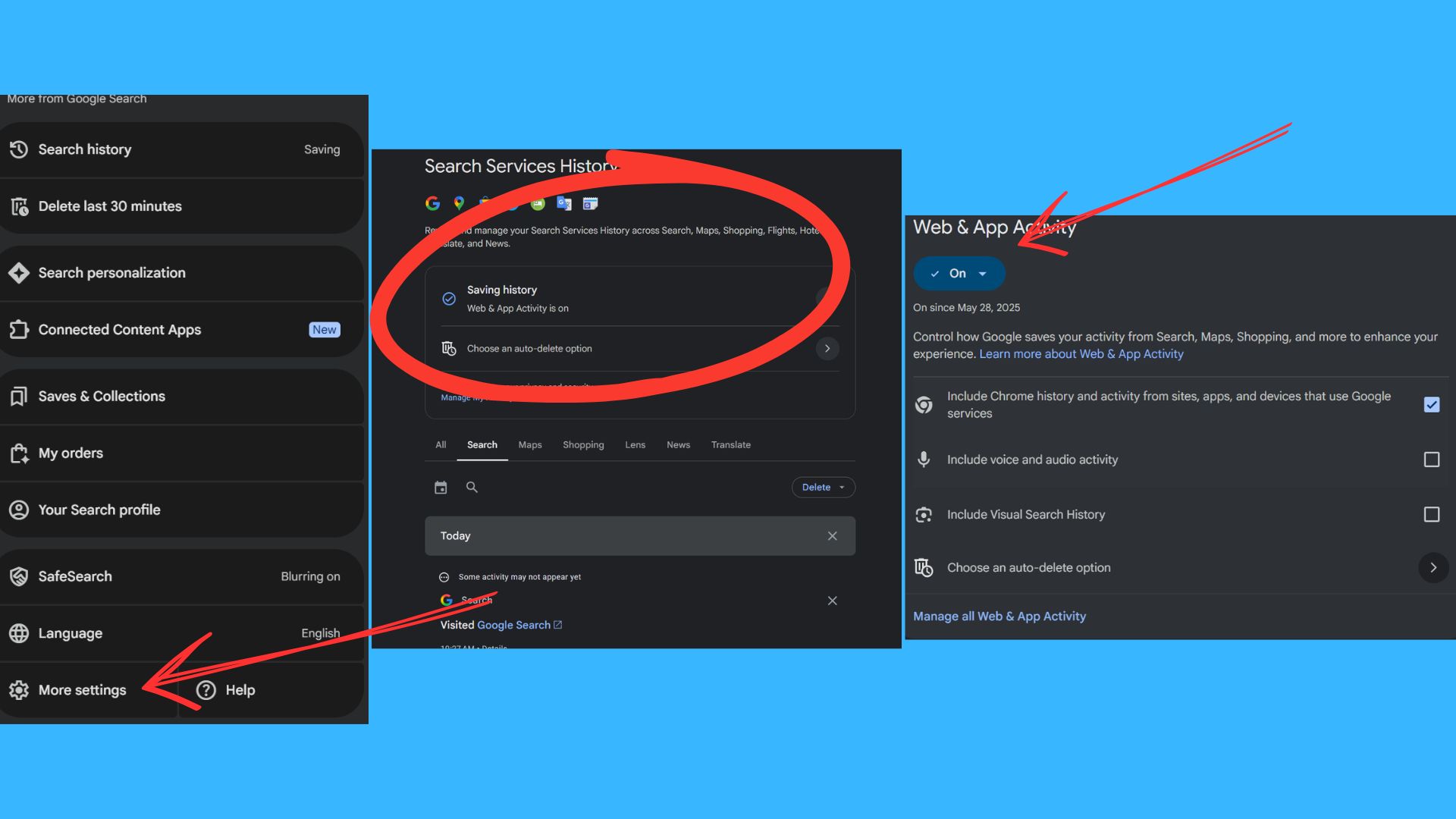
If you'd rather not save this media history, here's how to check the setting right now:
Open your Google Account settings page.
Navigate to the Data & Privacy tab and scroll to Activity Controls.
Locate Search Services History.
Look for the sub-option labeled Save Media.
Toggle it off.
That's it. The entire process takes less than a minute.
Before you disable everything
There is one important caveat to keep in mind before modifying your profile.
You may see advice online suggesting that you simply disable your entire "Web & App Activity" history. While that is a more comprehensive privacy option, it also drastically degrades many of the features people rely on every day.
Turning off Web & App Activity entirely will break or severely limit:
- Search context: Your active search history and autocomplete efficiency.
- Tailored recommendations: Personalized maps and routine shortcuts.
- Content feeds: Google Discover suggestions on your phone's home screen.
- Account personalization: General account tracking continuity.
For many users, switching off only the specific media-saving component inside the new setting represents the most practical middle ground. It protects your personal photos and voice logs without destroying your day-to-day usability.
The takeaway
We're entering a new phase of consumer AI where the data being collected isn't just plain text typed into a search box. It's photos of our homes, voice recordings from daily conversations, and personal videos we upload for analysis.
None of this means Google is doing something malicious or even unusual. Most major AI companies are actively trying to improve their systems using real-world human interactions. But it does mean our personal privacy settings deserve a modern, second look.
The reality is that many people never revisit their Google account preferences after creating their account, which is exactly why changes like this often fly completely under the radar.
Taking 20 seconds to review what data is being stored and deciding whether you're comfortable with it is one of the simplest, highest-impact privacy checks you can make this year.
Follow Amanda Caswell and stay ahead of the AI curve